The AI Document Extraction Workflow in Carbonly: A Screenshot-Led Walkthrough
A screen-by-screen walk through the Carbonly extraction workflow. Upload, review, confirm, ledger, dashboard, NGER report. Real product screenshots from the e2e test suite, not marketing renders.
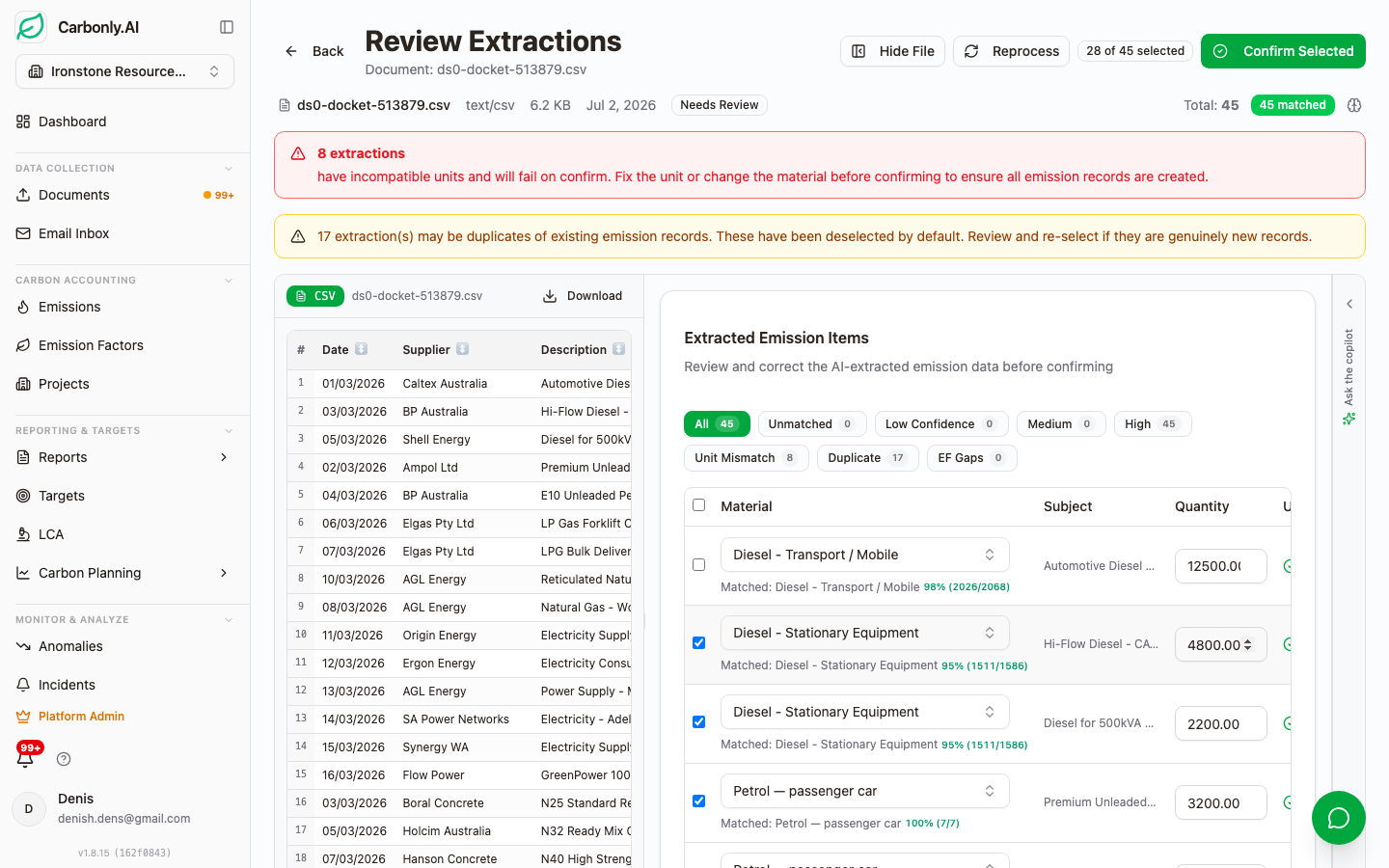
Most carbon accounting demos we sit through show three things: a hero dashboard, a stock photo of a wind turbine, and a slide with vendor logos. None of that tells you whether the extraction actually works on a real Boral concrete docket or a busted-scan Ampol fuel receipt.
So this post skips the hero shots. We are going to walk through the Carbonly extraction workflow the way a reviewer actually sees it. Every screenshot below is pulled straight from our end-to-end test suite. No mock-ups. No mid-fidelity renders. What you see is what a Contributor or Auditor sees when they log in.
If you are evaluating AI carbon accounting software, this is the question that matters: what does the working screen look like when the reviewer has to sign off on an emission record for AASB S2 assurance? Read on.
Why a screenshot walkthrough matters for AI carbon accounting evaluation
A polished dashboard means nothing if the audit trail underneath it cannot survive an ASSA 5010 limited assurance engagement. And in our view the risk with any polished UI is that manual re-keying can still be sitting underneath it, invisible from the demo.
Under AASB S2 paragraph 33 and the Australian assurance standard ASSA 5010, every disclosed emission number has to be traceable back to a source document, with a stated methodology, a stated emission factor version, and a review record. The Clean Energy Regulator applies the same logic to NGER Act 2007 submissions. If the reviewer cannot point at the invoice, the number does not stand up.
So the screens we care about are the boring ones. The review queue. The provenance badge. The factor version stamp on the ledger. That is where a platform earns or loses the auditor's confidence.
Step 1: Upload the source document
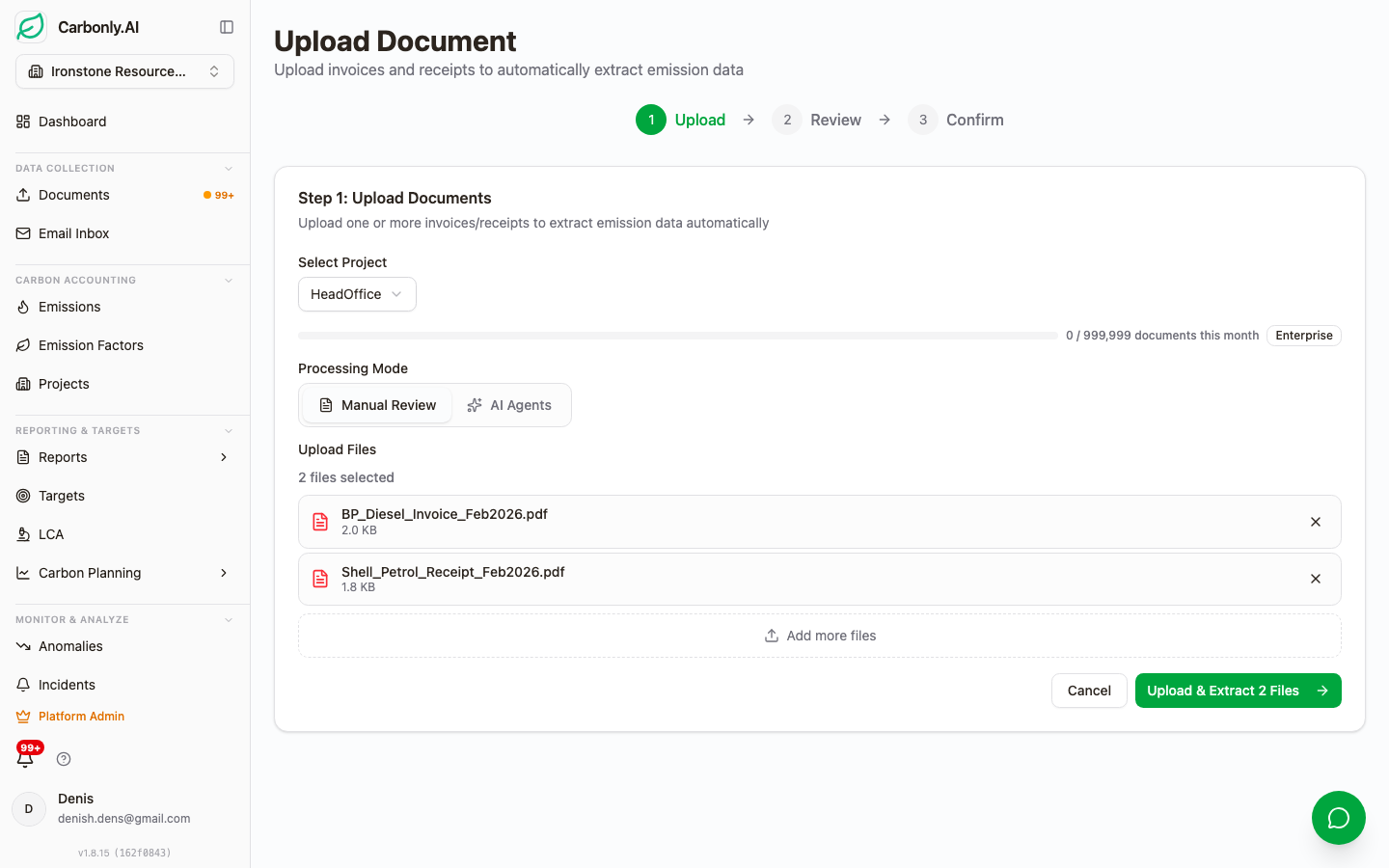
The upload screen is deliberately simple. Drag a file in, or point Carbonly at the source it already lives in. We support eight file formats out of the box: PDF, Word, PowerPoint, Excel, CSV, RTF, image files, and scanned images with a photograph-quality tilt.
Most operational data does not arrive one file at a time. So the drop zone is only one of three ways in. The second is a OneDrive or SharePoint folder-per-project sync: point the project at the supplier's shared folder and Carbonly pulls new invoices as they land. The third is per-project email ingestion. Each project has its own private ingestion address. Ask your fuel card provider or utility retailer to CC that address, and the invoices arrive automatically.
We chose these three surfaces for a reason. Reviewers use drag-and-drop for one-offs. Data teams use folder sync for high-volume suppliers like Ampol or Boral. And accounts payable teams use email ingestion because CC-ing an address is the only workflow change they will ever agree to.
Step 2: Review the AI-extracted line items
This is the screen most vendor demos hide. Extraction is easy to fake in a video. Reviewing extraction is where the platform lives or dies.
Every line item the AI pulls out arrives with two things attached: a confidence score, and a Match Provenance badge. The badge tells the reviewer how the emission factor was chosen. There are eight possible states: Exact NGA match, Alias match, Historical match on this project, EPD match, Global cache match, AI-inferred match, Manual override, and Unmatched. A reviewer glancing at the queue can tell instantly which records need attention and which are safe to confirm.
The matching itself runs through a five-tier cascade. Exact factor first, alias second, historical learning from this project third, EPD Australasia library fourth, then AI reasoning as the final fallback. That order matters. It means the same invoice from the same supplier gets the same factor every time once the alias is learned. We wrote up the mechanics of this in five-tier material matching for carbon accounting.
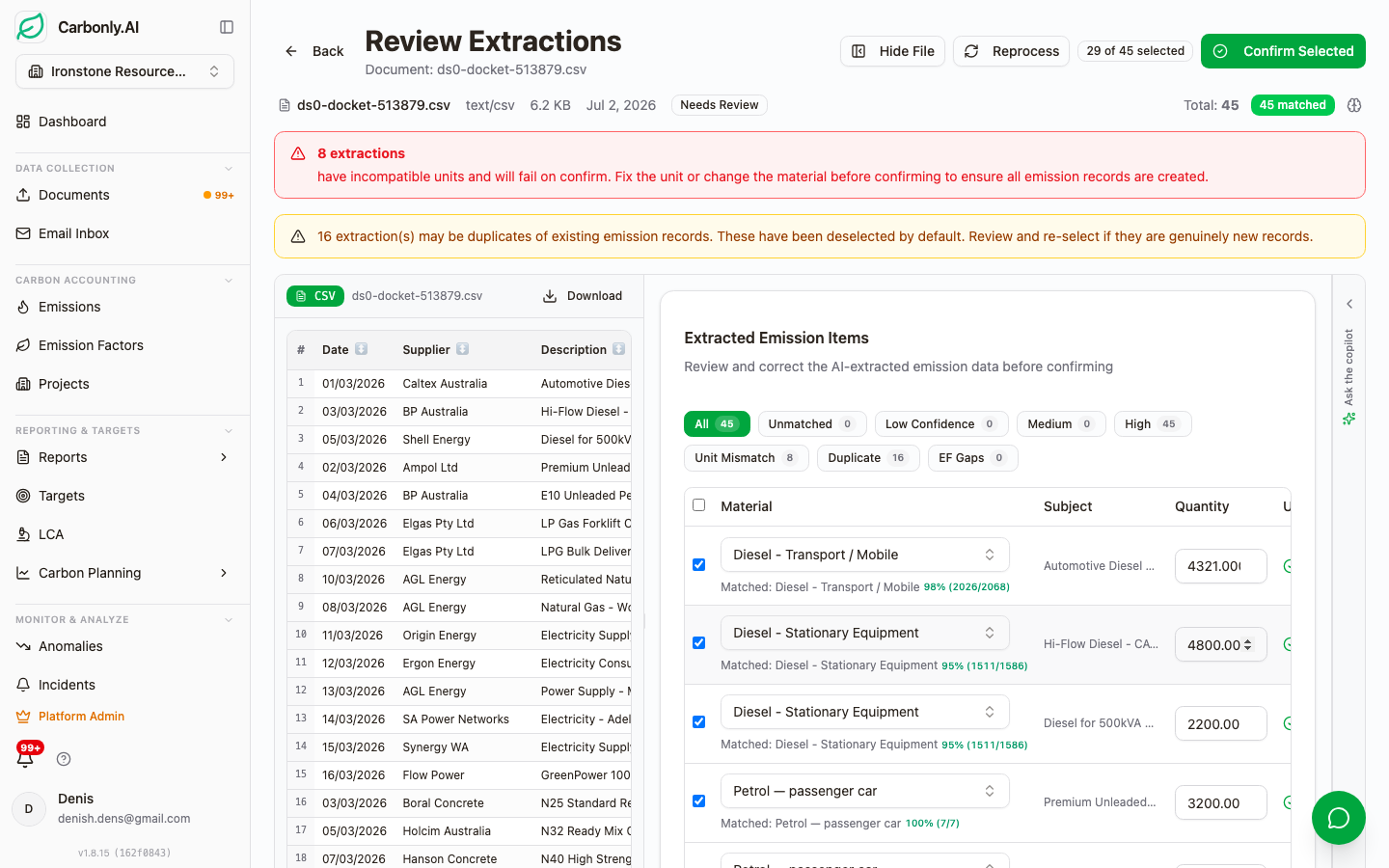
For each extracted row, the reviewer has three actions: Confirm, Correct, Reject. Confirm accepts the match and posts it to the ledger. Correct lets you swap the factor, and the correction is stored as an alias so the same line on next month's invoice matches automatically. Reject removes the line entirely and logs the reason.
That correction loop is the piece that compounds. Every alias a reviewer teaches Carbonly reduces the review burden next quarter. We described the human-in-loop mechanics in more detail in AI carbon accounting with self-learning and human-in-the-loop accuracy. And because supplier invoice formats stay reasonably stable, we build per-supplier extraction templates that dial up accuracy for common Australian sources like Boral, Ampol, and AGL. There is more on that in per-supplier extraction templates for Boral, Ampol and AGL.
We should be honest about one thing. The extractor is not perfect on first pass. Handwritten fuel dockets and low-DPI scans of Origin gas bills still trip it up occasionally. That is exactly why the Correct action is a first-class button, not a hidden edge case.
Step 3: Confirmed emissions land in the ledger
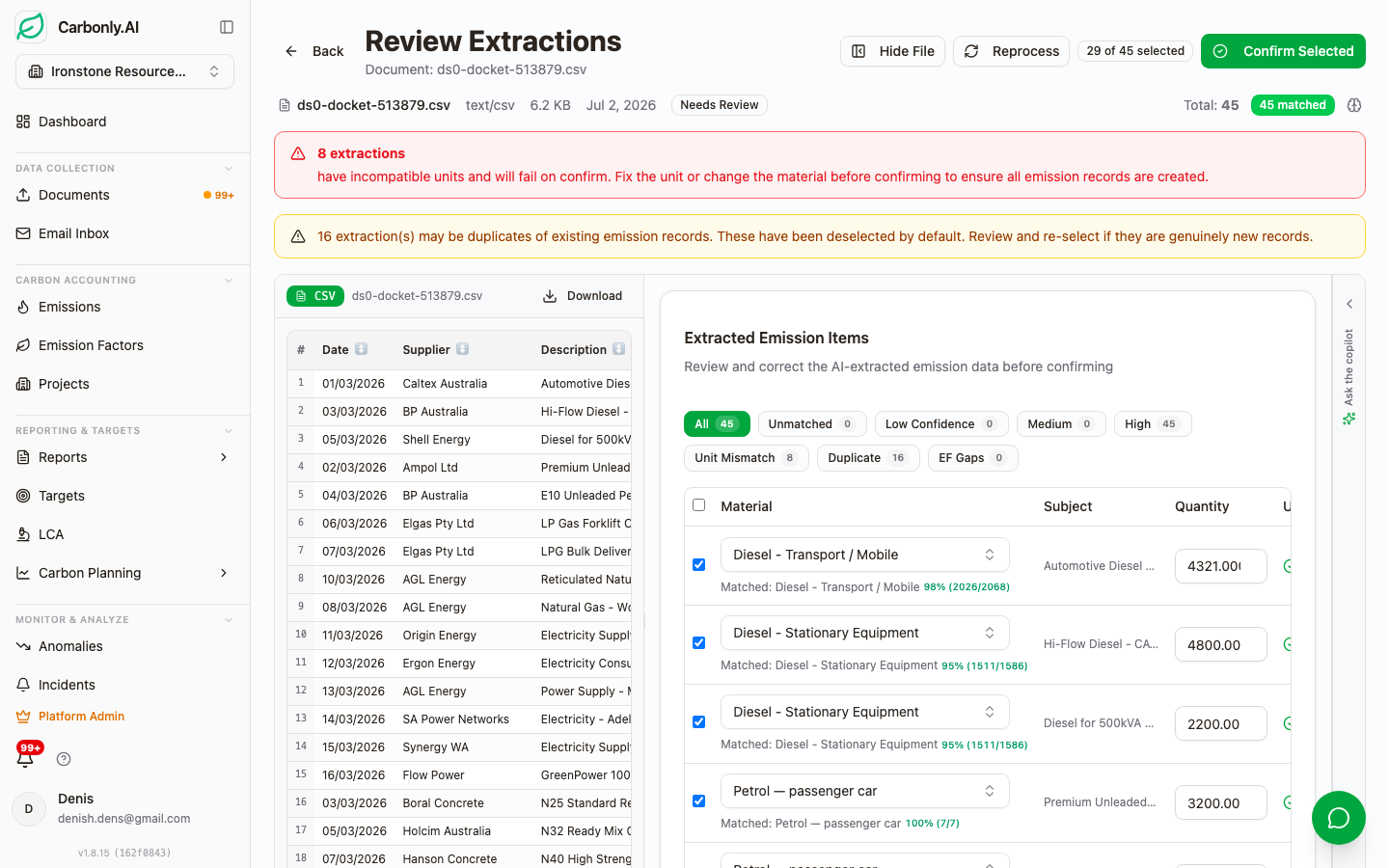
Once a reviewer confirms a line, it becomes a permanent ledger entry. Three things get stamped onto it, and in our view all three are essential to an assurance-ready ledger.
First, the methodology label. Every record shows whether the emission was calculated on quantity data (litres, kWh, GJ, kg) or spend data (dollars). Assurance providers care about this distinction because of the widely cited 30 to 40 percent error range associated with spend-based estimation. Our default is always quantity-based, because our AI reads the actual line item off the invoice rather than falling back to a spend proxy. We wrote up why this matters in AI document processing for fuel dockets and utility bills.
Second, the factor version stamp. Every record pins the exact NGA edition used at calculation time. DCCEEW NGA 2025. DCCEEW NGA 2024. And so on. When NGA 2026 lands, existing records do not silently drift. New records use the new factors and old records keep their original stamp. That is how you keep a defensible baseline against AASB S2 paragraph 33 target disclosures.
Third, the source document link. Click any ledger record and the original invoice or docket opens in a viewer. The assurance workflow reduces from "please retrieve invoice 47829-B from the archive" to a single click.
Projects and reporting periods
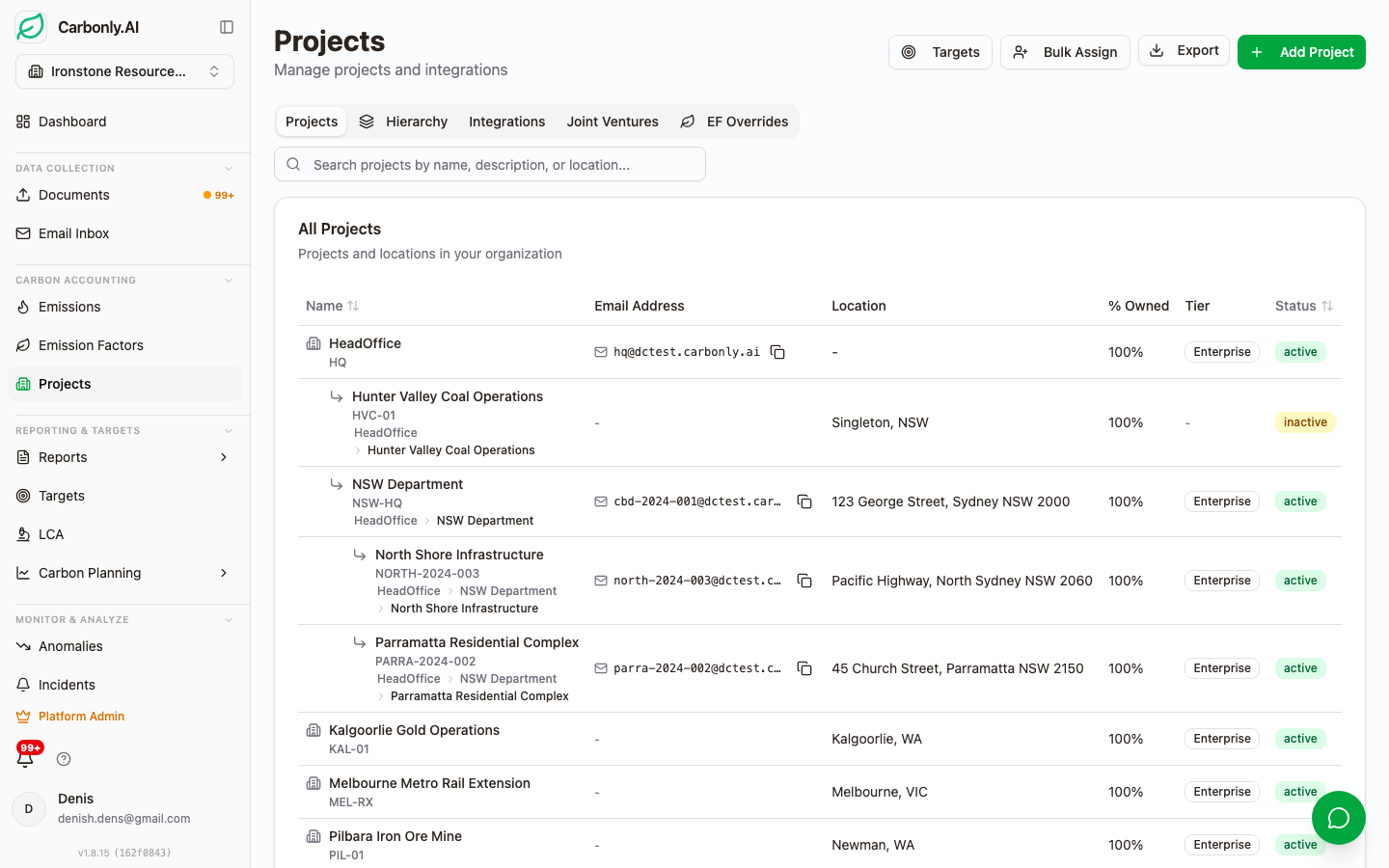
Projects are Carbonly's unit of aggregation. A project can be a facility, a site, a business unit, a joint venture stake, or a legal entity. The choice depends on how the reporting boundary is drawn.
Each project has its own OneDrive or SharePoint sync target, its own email ingestion address, its own emission factor library preference, and its own RBAC roster. That last part is worth pausing on. The six-role model (Owner, Admin, Manager, Contributor, Auditor, Viewer) plus a separate Supplier Portal role means an external auditor can be given time-boxed read access to a single project without touching your production data or other business units.
We designed projects this way because most Australian NGER reporters are not single-facility. A mid-tier construction contractor might have twelve concurrent project sites, each with a different concrete supplier, a different diesel fuel card, and a different reporting boundary. Aggregating those into a corporate group total for NGER Act 2007 submission requires that the per-site data stays intact underneath the roll-up.
The dashboard view
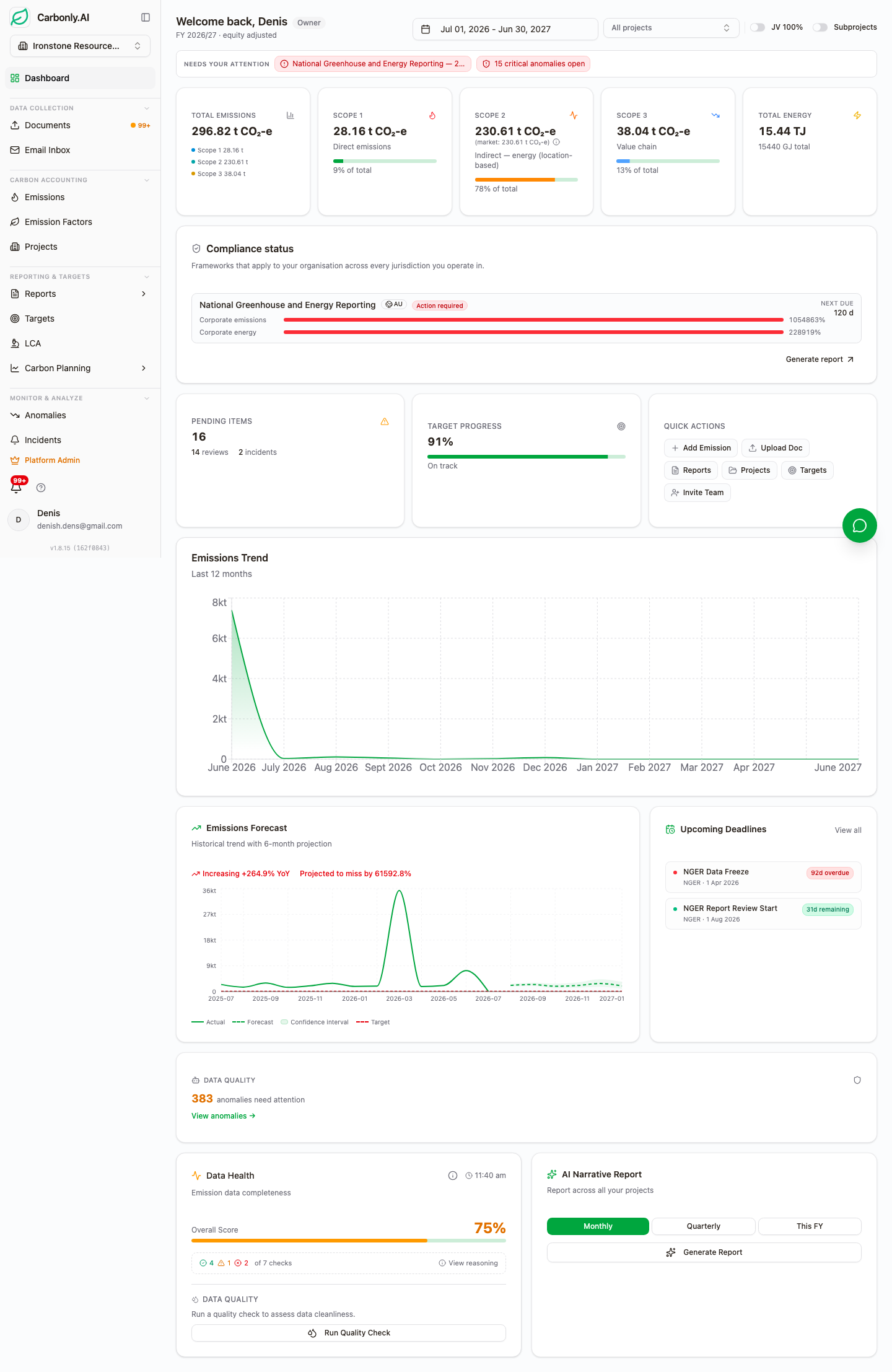
The dashboard sits on top of the ledger, not beside it. Every number you see is a live query against confirmed emission records. That distinction matters for two reasons.
The first is auditability. A dashboard tile that reads 4,182 tCO2-e Scope 2 for the quarter can be drilled all the way down to the electricity invoices that produced it. The auditor clicks the tile, gets the record list, clicks a record, sees the invoice. No re-keying, no lookup tables, no reconciliation gap.
The second is the anomaly detection layer. Because the ledger is the single source, anomaly detection can flag a spike in fugitive refrigerant Scope 1 for a hotel property, or a suspicious drop in diesel Scope 1 for a construction fleet, in real time as records are confirmed. The alert lands with the affected project's Contributor before the next reporting cycle closes.
Dashboards are customisable per role. A CFO viewing the workspace sees financial roll-ups. A site sustainability lead sees per-facility drill-downs. An Auditor sees the review queue and the methodology audit trail.
NGER report generation
The NGER report is the compliance surface most Australian reporters ask us about first. Here is what generation looks like end-to-end.
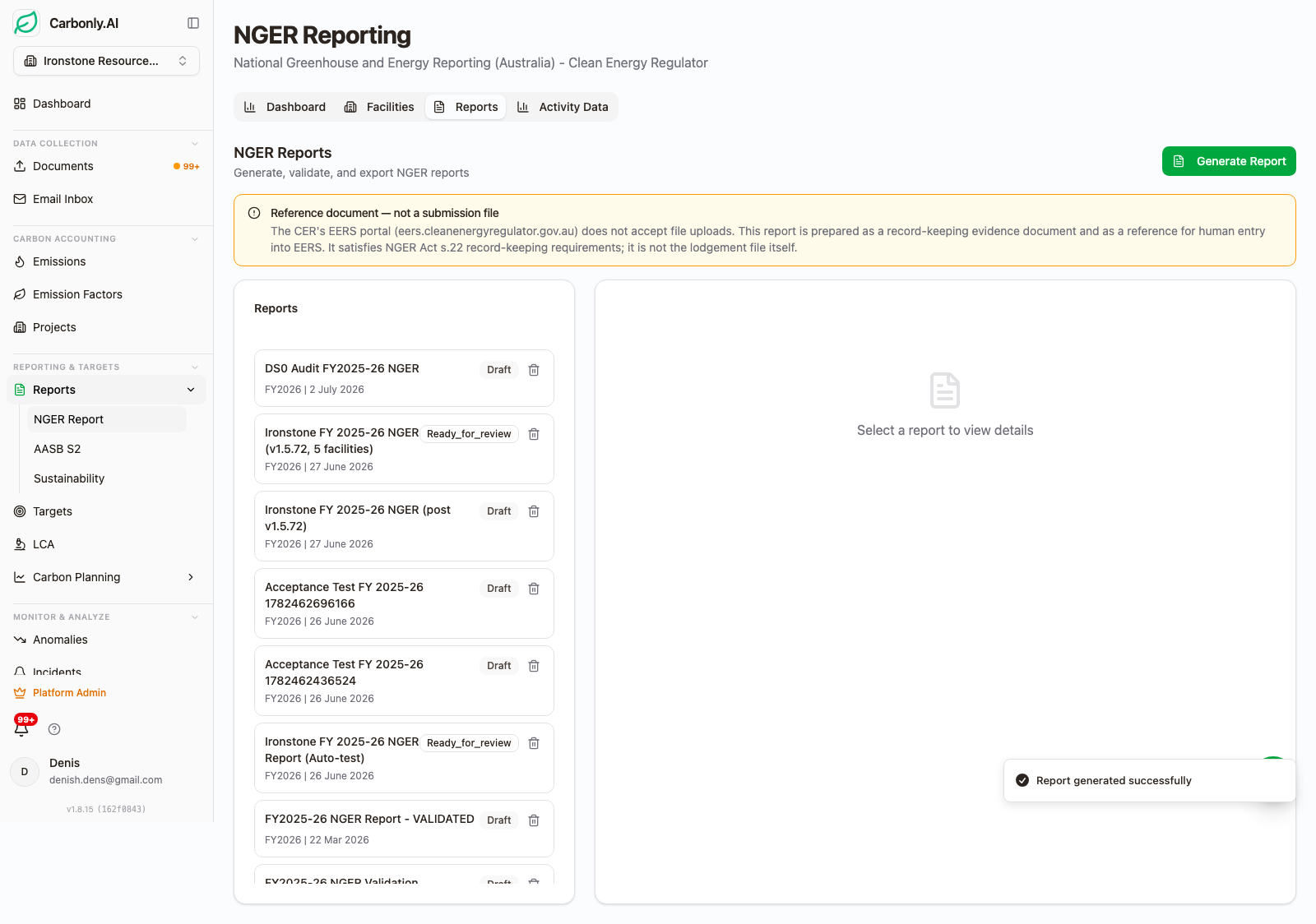
The generate step asks two questions. Which reporting period? And which measurement method should be applied to each activity category? NGER Method 1 uses default emission factors. Method 2 and Method 3 use higher-tier facility-specific or supplier-specific measurement. The choice can be different per category, and the platform records the choice against every record contributing to the calculation.
Method choice matters because facility-specific measurement can produce a materially different result from Method 1 defaults for the same underlying activity. We covered why in NGER report generation automation and the surrounding NGER content cluster.
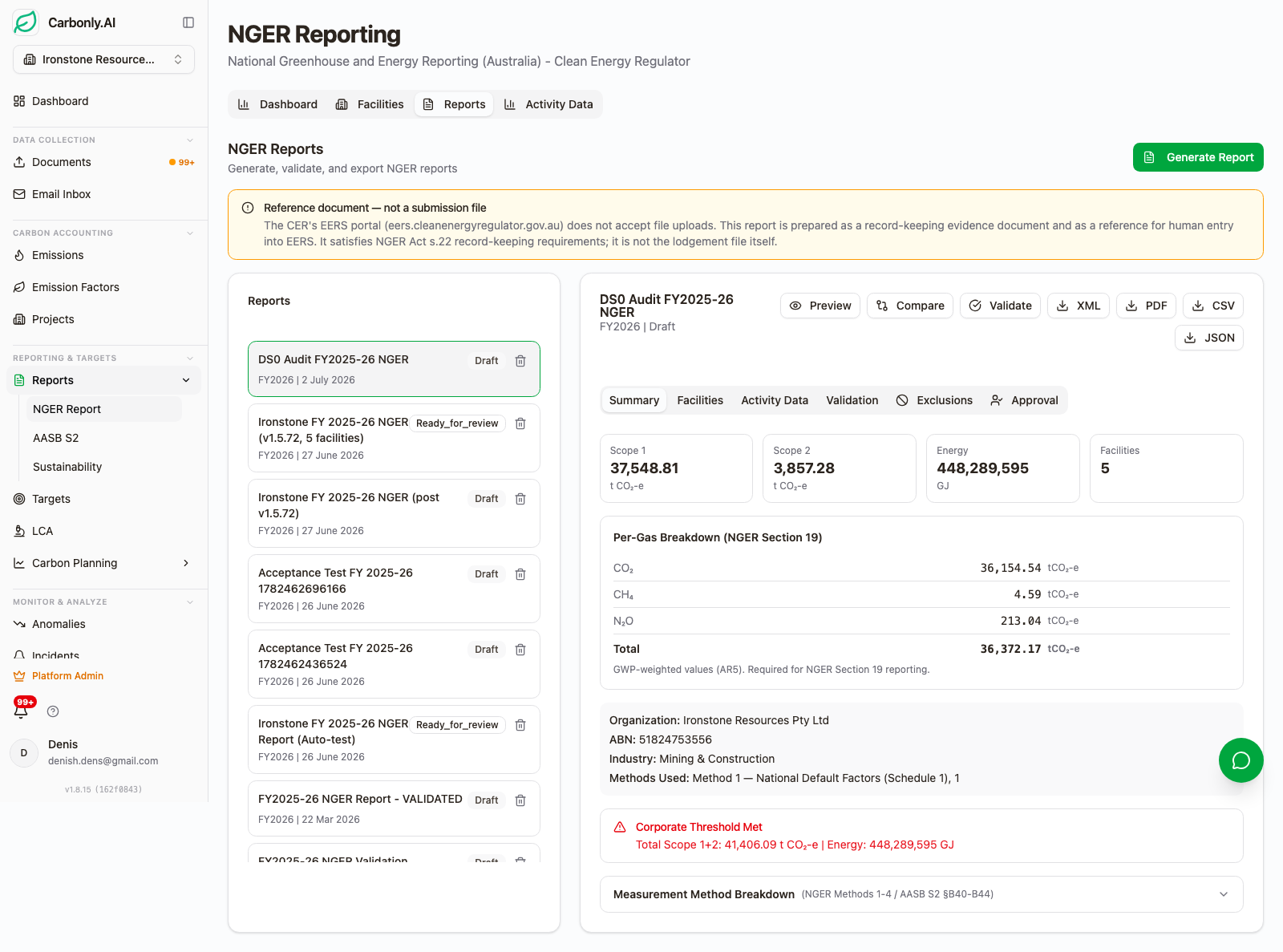
The summary screen surfaces the two numbers the Clean Energy Regulator cares about first: total Scope 1 and total Scope 2 for the reporting period, against the 25 kt CO2-e facility threshold and the 50 kt corporate group threshold. If a facility or group is above threshold, the screen makes it obvious. If it is under, the reporter has evidence of that too, which matters for boards worried about missed registration.
AR5 GWP values are applied at this render step, per the NGER technical guidelines. AASB S2 disclosures generated separately from the same ledger can be rendered with AR6 GWP values instead. The factor version stamp on every record means the switch is deterministic, not an assumption.
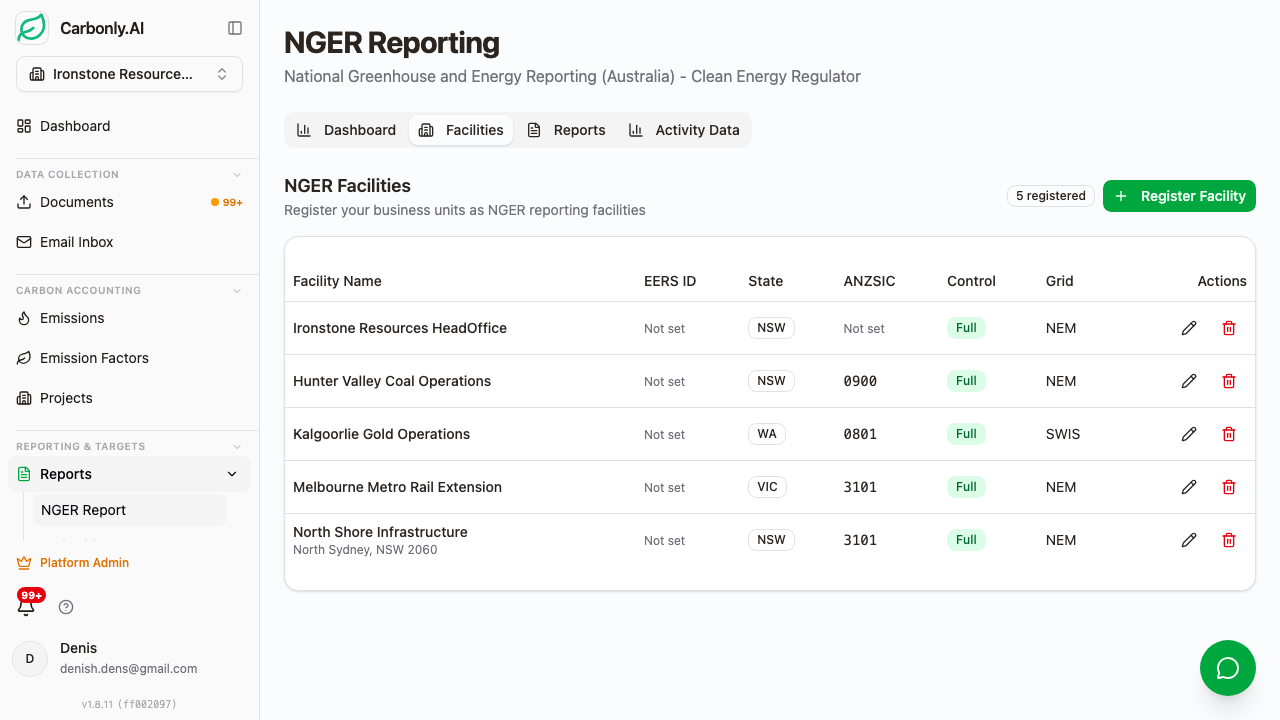
The per-facility breakdown is where NGER submissions actually get built. Each facility is listed with its Scope 1, Scope 2 (location-based and market-based where applicable), total energy consumed, and total energy produced. Click any facility and the underlying records are one further click away.
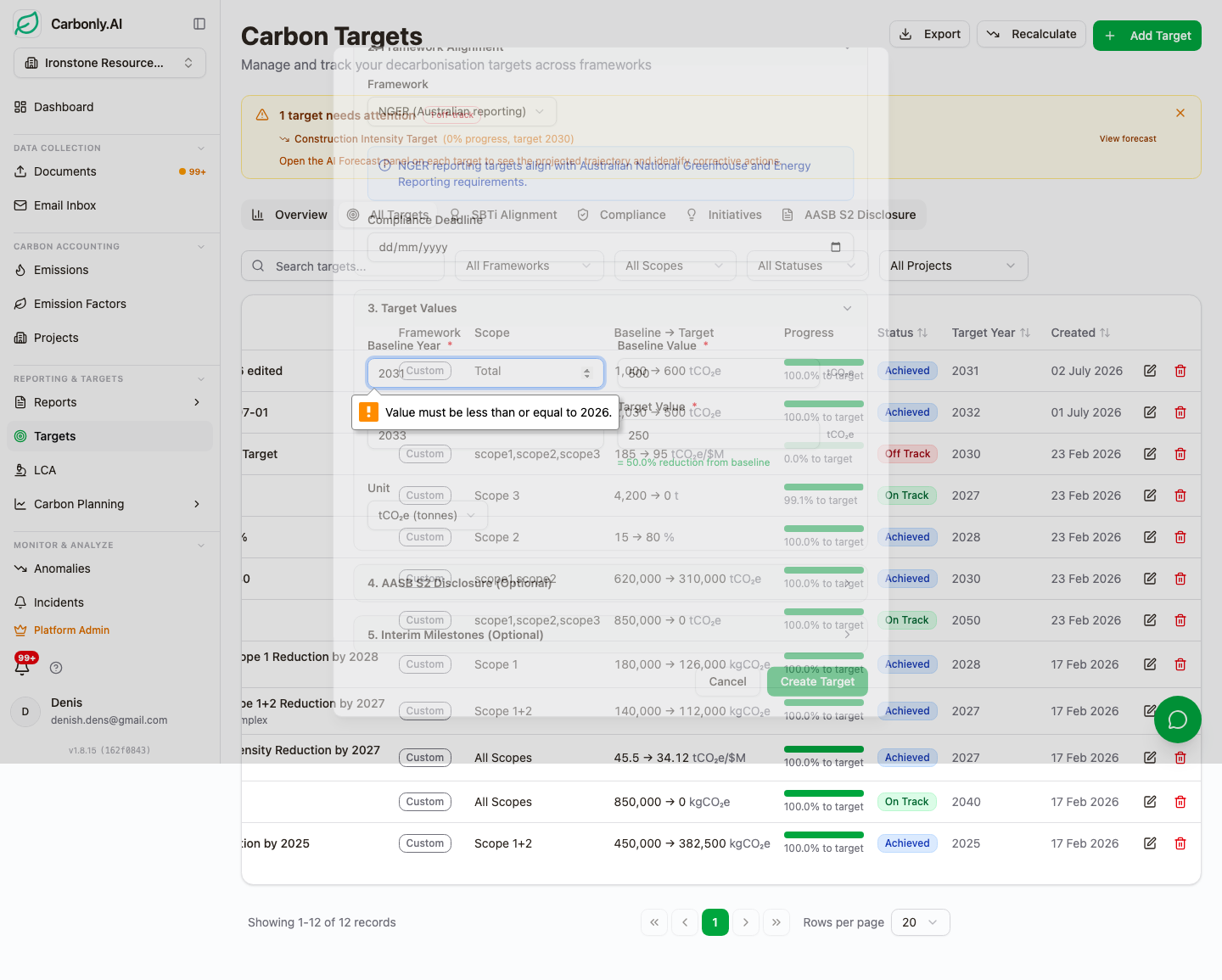
Before submission, Carbonly runs a validation pass against the NGER XML schema. Missing fields, invalid units, incomplete facility metadata: all surfaced before the file leaves the workspace. The submission itself goes through the Clean Energy Regulator's EERS portal, but the validation catches the errors that most reporters historically only find after upload rejection.
The Australian National Audit Office's performance audit of the NGER scheme reported that, of 545 NGER reports it reviewed, 72 per cent contained errors and 17 per cent contained errors classified as significant. The XML validator does not solve every category of that gap, but it eliminates the categorical mechanical failures.
What this walkthrough shows about Carbonly's design principles
Three things.
The first: extraction is not the product. Review is the product. AI can extract 200 invoices in ten minutes, but a mid-tier construction group has to sign off on those extractions before they turn into an NGER submission or an AASB S2 disclosure. So the Match Provenance badge, the confidence score, the Confirm-Correct-Reject action, and the alias learning loop are the actual working surfaces. Extraction just feeds them.
The second: the ledger is the source of truth for every downstream view. Dashboards, NGER reports, AASB S2 disclosures, Auditor Workspace exports, anomaly detection, target progress tracking. All of it queries the same confirmed emission records. That is what lets an assurance provider follow a number from the disclosure back to the original invoice in three clicks.
The third: consultants are our biggest allies here. If a Big 4 or specialist ESG consultant is leading a client's ASRS engagement, the workflow above is exactly what a consulting practice needs to scale beyond one senior manager and a spreadsheet. Carbonly is the workshop; the consultant remains the craftsperson. Practices running client engagements can seat their client teams as Contributors and Auditors and control the boundary through RBAC.
If you are past the pitch-deck stage and evaluating platforms in earnest, we would rather show you the working screens against your own documents than talk about ours. Send a handful of Ampol dockets, an AGL invoice, and a Boral concrete delivery note to hello@carbonly.ai and we will run them through the review workflow with you on a call. Per-project pricing, one hundred dollar minimum per workspace per month.
FAQ
Can I try the platform before signing up? Yes. We will set up a workspace and run your own documents through it. Send a batch of source documents to hello@carbonly.ai and we will process them end-to-end so you can see the review workflow, confidence scores, and ledger stamps against invoices you already know the correct answer for.
What file formats does the AI extract from? Eight formats: PDF, Word, PowerPoint, Excel, CSV, RTF, image files, and scanned images. That covers roughly every source we have encountered in Australian utility, fuel, materials, and freight billing.
How does the reviewer confirm or correct an extraction? Each extracted line item has three actions: Confirm, Correct, Reject. Confirm posts to the ledger with the current match. Correct lets you swap the factor and stores the change as an alias so the same line matches automatically next month. Reject removes the line with a logged reason.
How does the NGER submission work? The generate step selects reporting period and NGER Method 1, 2, or 3 per activity category. The summary and per-facility screens show totals against the 25 kt facility and 50 kt corporate group thresholds. XML validation runs before submission. The submission itself goes through the Clean Energy Regulator's EERS portal, and every ledger record backing the report retains its source-document link and factor version stamp.
What if the extraction is wrong? Reviewers use the Correct action, which both fixes the current record and stores an alias so future invoices from the same supplier match correctly on first pass. The correction, the reviewer, and the timestamp are all logged in the audit trail. We publish the reasoning behind the human-in-loop design in AI carbon accounting with self-learning and human-in-the-loop accuracy. Advanced users can also connect ChatGPT or Claude directly to the live ledger through the MCP endpoint, described in Connect ChatGPT or Claude to your carbon data.
Related reading
- AI document processing for fuel dockets and utility bills
- AI carbon accounting with self-learning and human-in-the-loop accuracy
- Per-supplier extraction templates for Boral, Ampol and AGL
- Five-tier material matching for carbon accounting
- Connect ChatGPT or Claude to your carbon data
- NGER report generation automation
- AASB S2 climate disclosure report generation